Flash Video (flv) has become the default video format on the web and almost every video sharing site uses FLV to stream videos online. And its not just the YouTube clones, even media properties like CNN have switched to Adobe Flash Video.
Other than viewing Flash videos in your browser, some of download FLV files locally to enjoy web videos offline.
Everything You Wanted to Know about Editing FLV Flash Videos
Watching videos in an FLV player is half the fun - you can do so many other things like split FLV videos into multiple clips, trim the introductory part, convert flv videos to MP3 songs, extract image frames from the video, etc. Lets get started:
Q: How to Edit FLV Videos with expensive video editors ?
There are no standalone FLV editors around but if you have Adobe AIR, I highly recommend RichFLV - a lightweight flv editor that lets you do almost everything with FLV video clips.
With RichFLV, you can split flv files by adding cue-points, join two or more FLV video clips by stitching or add new MP3 sound tracks over your existing FLV video. Perfect if you want to edit YouTube videos on the computer.
Mac users have another good option - download Perian that turns Quick Time Pro into a FLV editor.
Q. How to convert FLV videos into MP3 audio files ?
To extract audio from flv files, get the free FLV Extract utility from moitah.net - the video is saved as an MP3 file and the quality of sound in the original video is maintained as there’s no encoding done to save the audio.
Alternatively, you can extract MP3 from FLV files only using Vixy.net - an online service.
Q. Which media players can play Flash Videos on the desktop ?
To play FLV video files on the desktop, you can use Adobe Media Player, VLC Media Player or this standalone player which I think is the best flv player around for XP or Vista.
If you are on a Mac, you can play FLV videos downloaded from YouTube in your QuickTime player using the free Perian component discussed above.
Q. How to extract image frames from FLV Videos ?
You can export any image frame out of the FLV video using either the RichFLV editor or through VLC Media Player.
Open the .flv file in VLC, navigate to the frame that you want to save as an image and press Ctrl+Alt+S (or Video -> Snapshot). Note that the regular Print Screen key will not work for capturing screenshot from FLV file.
Q. Where can you upload FLV Video files on the web ?
Blip.TV - none of the other video sharing sites accept FLV format files.
Related - Why Choose Blip.TV over YouTube
Q. How to Embed FLV video clips in web pages ?
Read this guide on how to embed flv files in web pages. Alternatively, you could upload the file to Blip.TV and use the embed code provided by Blip.TV.
Q. How to Convert FLV videos to other video formats like WMV, AVI, etc ?
Use SUPER - the program may look complex at first glance but don’t worry, it’s very easy. I think it even lets you convert SWF movies into FLV videos.
Q. How to create new FLV movies files from scratch ?
VideoSpin is the only free video editing software I know of that can export movies into Flash Video format. An alternate trick is export your video into Windows Media or AVI and convert it into FLV using a converter program like SUPER .
For more tips and tricks regarding YouTube and Google Videos, check our previous guide on Interesting Things to Do with YouTube Videos.
woensdag 5 maart 2008
Flash Video Editing Made Simple - Learn Everything about FLV Videos

woensdag 2 juli 2008
Flash nu beter te indexeren door zoekmachines

zaterdag 29 juli 2006
ReadyBoost Vista

Samsung Electronics heeft vandaag een 4GB solid state disk (SSD) aangekondigd die volgens het bedrijf binnenkort in productie gaat.
De flash-gebaseerde NAND schijf is met name bedoeld als zeer snelle cache voor gebruik in notebooks en pc's in combinatie met Microsoft Windows Vista.
Volgens Samsung zal de schijf compatibel zijn met ReadyBoost, een feature van Windows Vista dat de reactiesnelheid van een PC drastisch moet verhogen door data die veel aangeroepen wordt door het systeem op te slaan op een snel flash-geheugen in plaats van op een disk-gebaseerde harde schijf.
"Door de data van de harde schijf te cachen middels Samsung's flash SSD in combinatie met Microsoft Windows Vista ziet de doorsnee gebruiker een flinke toename in de snelheid van hun PC, die bliksemsnel zal worden"
De Samsung flash-gebaseerde schijf wordt aangesloten op het moederboard via de ATA poort, en werkt met 4 GB NAND geheugen. Omdat Windows Vista automatisch alle data in het ReadyBoost compatible geheugen comprimeert, zal de Flash gebaseerde schijf in de praktijk ongeveer 8 GB aan data kunnen bevatten.
Prijzen en levertijden zijn nog onbekend. Meer productinformatie vindt u op de Samsung website.
vrijdag 28 juli 2006
Windows XP Home op een USB
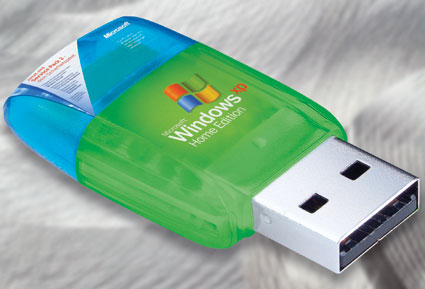
All it takes is a minor error in the Windows Registry or a virus infection, and your operating system can become unbootable. But with a properly configured USB flash drive on hand, you'll always have a compatible replacement no further away than your pocket or keychain. In addition, the flash drive can also provide a secure browser and virus scanner, and lets you take your favorite DVD burning and Office software with you wherever you may go.
All that's needed is a bootable USB Flash drive with at least 256 MB of storage capacity and a Windows Setup CD. Using the program Bart PE Builder (Freeware), you can install Windows XP on the flash drive, along with other software as needed (and as available space permits).
Compact
Bart Lagerweij's free utility, PE Builder, condenses the original setup data for Windows XP into a slender operating system that is ready to run from a CD or a USB flash drive. This compact, portable version of Windows includes all the important system tools for dealing with a PC emergency. You can even add other programs to this collection, such as the media writing tool Nero Burning ROM or an anti-spyware package such as Ad-Aware SE Personal, during the installation “http://tomshardware.co.uk/2005/09/09/windows_in_your_pocket/ “
dinsdag 4 december 2007
Adobe Flash Player 9
Adobe Flash Player is an advanced client runtime for delivering powerful and consistent user experiences across browsers, operating systems and mobile devices.
Installed on over 820 million Internet-connected desktops and mobile devices, Flash® Player enables organizations and individuals to build and deliver great digital experiences to their end users.
maandag 6 april 2009
Tips om Firefox supersnel te maken!
5 Tips om Firefox supersnel te maken!
Ondanks dat Firefox een erg snelle browser is en over het algemeen vlotte laadtijden heeft kan het natuurlijk altijd beter. Firefox kent vele aanpassingsmogelijkheden en je kunt het naar hartelust finetunen en afstemmen op je wensen. Hier een aantal tips en tweaks die Firefox een flinke snelheidsboost geven en jezelf kostbare tijd kunnen besparen.
1. Pipelining activeren
Een van de meest gebruikte en meeste bekende methoden om Firefox sneller te maken is het inschakelen van pipelining. Pipelining maakt het mogelijk dat de browser meerdere verzoeken tegelijk naar een server kan sturen in plaats van 1 en dan te wachten op antwoord alvorens het volgende verzoek te versturen.
Om dit te activeren, typ about:config in de adresbalk van Firefox, dubbelklik op network.http.pipelining en network.http.proxy.pipelining om de waarden op true te zetten. Dubbelklik vervolgens op network.http.pipelining.maxrequests en zet deze naar 8.

2. Sneller renderen
Bij grote en complexe webpagina’s kan het een tijdje duren voordat de hele pagina geladen is. Om je niet te lang te laten wachten laat Firefox standaard elke 0.12 seconden zien wat er ondertussen geladen is (content notify interval). Dit zorgt ervoor dat de browser vlot reageert, maar het kan ook de totale laadtijd van een pagina vergroten.
Typ about:config in de adresbalk en druk op [Enter], rechtsklik ergens in het scherm en kies Nieuw > Integer en typ content.notify.interval als voorkeursnaam. Klik op OK, vul 500000 in, en klik weer op OK. Rechtsklik weer ergens in het scherm en kies Nieuw > Boolean. Typ content.notify.ontimer en zet de waarde op true.
3. Sneller laden
Als je 0,75 seconden lang je muis of toetsenbord niet aanraakt gaat Firefox automatisch in een lage reactie modus, waarbij de browser minder vlot reageert, maar sneller de webpagina laadt. Door deze tijd te verlagen kun je de prestaties van Firefox verhogen.
Typ about:config in de adresbalk, druk [Enter], rechtsklik en selecteer Nieuw > Integer. Typ content.switch.threshold en vul een waarde in van 250000 (0,25 sec) en klik op OK om te voltooien.
4. Flash animaties blokkeren
Flash animaties kom je op veel websites tegen en hoewel ze soms erg mooi en functioneel zijn kunnen ze het laden en functioneren van een webpagina flink vertragen. Hier is echter een simpele oplossing voor: Flashblock. Deze extension blokkeert alle Flash animaties, zodat webpagina’s veel sneller laden.
5. Cache geheugen vergroten
Tijdens het browsen worden afbeeldingen en scripts door Firefox in het cache geheugen opgeslagen. Als je dan dezelfde webpagina opnieuw bezoekt, wordt de betreffende data uit dit cache geheugen gehaald om de webpagina sneller te kunnen laden. Je kunt zelf eenvoudig de grootte van dit cache geheugen vergroten. Typ about:config in de adresbalk, druk [Enter], rechtsklik en selecteer Nieuw > Integer. Typ browser.cache.memory.capacity, klik op OK, vul dan 65536 in, klik OK. Sluit en herstart Firefox nu om gebruik te maken van de nieuwe cache grootte.
dinsdag 4 juli 2006
Voor USB sticks, van de overheid/ computers.
Today's tip is on recovering deleted files from your hard drive... Accidentally deleting files is something we all try to avoid, but it can happen on occasion... Emptying the recycle bin before checking its contents, performing a Shift+Delete on a file or folder, or deleting a file from the command line can all render your data invisible to XP, and seemingly lost forever... This can be quite upsetting if the data in question was something you've spent a lot of time working on... Fortunately, your chances for recovery of deleted data are actually quite good, especially if you take immediate action...
Windows XP does not ship with any application for assisting you in recovering your data, so I would recommend using a free application called Restoration... This program is very effective at recovering deleted files from your hard drive... The application does not require installation either, so it is a handy application to carry on a USB flash drive as well...
deleting files is something we all try to avoid, but it can happen on occasion... Emptying the recycle bin before checking its contents, performing a Shift+Delete on a file or folder, or deleting a file from the command line can all render your data invisible to XP, and seemingly lost forever... This can be quite upsetting if the data in question was something you've spent a lot of time working on... Fortunately, your chances for recovery of deleted data are actually quite good, especially if you take immediate action... Windows XP does not ship with any application for assisting you in recovering your data, so I would recommend using a free application called Restoration... This program is very effective at recovering deleted files from your hard drive... The application does not require installation either, so it is a handy application to carry on a USB flash drive as well...
http://www.geocities.jp/br_kato/rest2514.zip
Simply select the drive you'd like to restore from in the pulldown menu at the upper right, then click on the "Search Deleted Files" button... After the search is complete, select the files you'd like to restore and click on the "Restore By Copying" button...
It is important that you try to restore your files either to another drive or partition, so as to avoid overwriting information on your source drive... So if you only have one drive/partition, try to restore the data to diskette, USB flash drive, or a network drive...
Hopefully you'll never need to put today's tip to use, but if you ever need to undelete files, now you'll be prepared...
vrijdag 23 december 2005
D600
De SGH-D600 is het nieuwe paradepaardje in het gsm-assortiment van Samsung. Het is voornamelijk een upgrade van de eerder door ons geteste
Tijdens het uitpakken van de quad-band SGH-D600 werden we meteen aangenaam verrast. Zoals de meeste mensen kunnen beamen is Samsung zeer zuinig met zijn meegeleverde accessoires. Deze keer is het net iets anders. Zo hebben we nu in plaats van de gebruikelijke grijze oplader, die niet echt past bij een zwart toestel, een mooie bijpassende zwarte oplader. Daarnaast hebben we ook een USB-datakabel, software om je toestel volledig te synchroniseren met de pc en 'last but not least' een videokabel. Met deze kabel heb je de mogelijkheid om de D600 op je televisietoestel aan te sluiten. Na aansluiting op de tv wordt het volledige menu afgebeeld op je tv.Je kunt je afvragen wat je hieraan hebt? Wel het kan een handig extraatje zijn om video's of foto's die je genomen hebt met je D600 te tonen aan vrienden in 'dia-stijl'. BeeldkwaliteitDe SGH-D600 heeft een TFT-kleurenscherm met 262.144 kleuren. Met een resolutie van 240 x 320 pixels is het scherm ook net iets groter dan bij de D500. Wanneer we de D600 aanzetten, merken we meteen een superieure beeldweergave op. Samsung is er duidelijk in geslaagd om nog een stapje verder te gaan qua beeldtechnologie op een klein toestel als de D600 (94 x 45 x 21 mm). Ook de D600 gebruikt het welgekende schuifmechanisme. Bij de D500 was dit niet van de beste kwaliteit. Jammer genoeg moeten we concluderen dat dit weer het geval is. Er blijft speling wanneer we het toestel open hebben geschoven. Dit geeft de indruk dat het gemakkelijk kan breken. Nog een vervelend puntje aan dit mechanisme is dat het mechanisme heel gemakkelijk openschuift wanneer je deze mobiel in je broekzak hebt zitten en eruit haalt wanneer je een oproep krijgt. Hierdoor wordt de oproep al meteen beantwoord. Bij de D500 werkte dit beter. De numerieke toetsen zijn wel verbeterd ten op zichte van de D500, ze voelen robuuster aan.
CameraDe D600 heeft een 2.0 megapixel camera met flash waarmee je zeer mooie foto's en video's kan nemen. De plaatsing van de camera is echter ongelukkig gekozen. Bij de D500 was de camera geplaatst achter het schermgedeelte. De camera wordt dan ook beschermd wanneer de mobiel wordt dichtgeschoven. Bij de D600 zit de camera niet meer aan de binnenkant. De camera wordt zo niet meer beschermd en wanneer je een foto wil nemen, ga je vlug een vinger op de lens plaatsen. Maximale resolutie van video's en foto's zijn respectievelijk 352 x 288 en 1600 x 1200 pixels. Dankzij de aanwezigheid van een uitbreidingsslot voor een Trans Flash-geheugenkaartje kan je het eerder kleine geheugen van 54 MB uitbreiden. Trans Flash biedt momenteel wel maar een maximumcapaciteit van 512 MB.
BedieningHet menu werd vooral visueel vernieuwd. Er blijven nog steeds overbodige stappen die je moet doorlopen om bijvoorbeeld een doodgewone sms te versturen. Wat we ook voor het eerste terugzagen op een Samsung-mobiel zijn ingebouwde externe luidsprekers. Bij de D500 kwam nog het onhandige luidsprekertje dat je extern moest aansluiten. Dit is vanaf nu volledig verleden tijd. De D600 heeft twee luidsprekers die stereogeluid vormen en die je kunt gebruiken tijdens het bellen of het afspelen van muziek via je ingebouwde MP3-speler. De aanwezige Bluetooth-voorziening werkte tijdens onze test naar behoren. Het is mogelijk om verschillende bestanden tegelijk te versturen. Tijdens de overdracht naar de pc ondervonden we toch nog enige problemen met deze functie. De beste oplossing hiervoor is gebruik te maken van de datakabel wanneer je meerdere bestanden gaat versturen. Enkele leuke extra's zijn de mogelijkheid tot openen van Excel-, PowerPoint-, Word- en PDF-bestanden. De D600 is verder standaard voorzien van drie games: Forgotten Warrior, Free Kick en Arch Angel. De Lithium-Polymeer batterij houdt het volgens opgave 3,5 uur uit tijdens gesprekken en tot 280 uur in ruststand. De adviesprijs van de Samsung SGH-D600 bedraagt 469,- euro.
ConclusieSamsung is er duidelijk in geslaagd de D500 succesvol te upgraden. Zo zijn de camera en de beeldweergave flink verbeterd. Het is echter wel jammer dat er nog te weinig aandacht werd besteed aan de bouwkwaliteit van de SGH-D600. Vooral het schuifmechanisme had best wat steviger gemogen.
woensdag 16 mei 2007
How Flash Memory Works
Electronic memory comes in a variety of forms to serve a variety of purposes. Flash memory is used for easy and fast information storage in such devices
donderdag 26 april 2007

donderdag 1 februari 2007
ReadyBoost
Useful tweaks
Speed it up with a flash drive: Perhaps one of my favorite performance-improving strategies, using Windows Vista's new ReadyBoost technology, you can speed up your PC on the fly by simply plugging in a USB drive (or iPod or Compact Flash card or any external drive) with some spare megabytage. 
.
Windows ReadyBoost is a great technology, caching things on USB drives to improve system performance, but Windows Vista insists on checking the drives for certain speed requirements before enabling the feature. If you have a USB drive that is just a hair to slow to beat the test, or you want to use an external hard drive (slower speed, loads of cache space), how you can force Vista to let you use ReadyBoost on an unsupported device, whether it wants to or not:
• 1. Plug in the device.
• 2. Open the Readyboost tab on the device properties.
• 3. Select “Do not retest this device”
• 4. Unplug the device
• 5. Open regedit (start->run->regedit)
• 6. Expand - HKLM (Local Machine)SOFTWARE-Microsoft-Windows CurrentVersion-EMDgmt
• 7. Find your device.
• 8. Change Device Status to 2
• 9. Change ReadSpeedKBs to 1000
• 10. Change WriteSpeedKBs to 1000
• 11. Plug in the device.
• 12. Enable Readyboost!!!!
Try to see if it improves performance, especially when dedicated 30 gigabytes of an external drive to ReadyBoost, or if Microsoft’s speed test knows what it’s talking about.
Windows Vista's SuperFetch and ReadyBoost Analyzed Tom's Hardware
woensdag 2 januari 2008
IE7 Pro
IE7pro is an add-on for IE 7 which adds lots of features and extras to make your IE easier, more useful, secure and customizable.
You can use IE7pro as Tab Enhancement, Super Drag Drop, Crash Recovery, Proxy Switcher, Mouse Gesture, Tab History Browser,Inline Search,Spell Check,Auto fill Form, User Agent Switcher, Webpage Capturer, Greasemonkey alike user script ,AD Blocker, Flash Block,for IE and etc .
Using IE7pro, you can Close/Open tab by double left click, switch proxy, switch user agent, block ads and flash, recover browser crash, apply super drag drop, auto scroll page, manage tab history, refresh tab automatically, open new tab from address bar and favorites, view page information and save whole page to images quickly .
Retrieved from "http://wiki.ie7pro.com/index.php/What_is_IE7Pro"
donderdag 29 juni 2006
SanDisk Cruzer® Titanium USB Flash Drive Windows ReadyBoost

Cruzer™ Titanium is an extremely rugged and incredibly fast USB Flash Drive (UFD) that connects to a computer's USB port. Available in 1GB and 2GB capacities, users can easily store their key documents, pictures, music & video clips and transfer them to another computer with a USB port. Small, compact size fits on any keychain. New retractable USB port eliminates the need for caps and protects your USB connector.
Cruzer™ Titanium is rugged, fast, and smart. The Cruzer™ Titanium is built with Liquidmetal® casing that is crush-resistant over 2,000 lbs and has lightning speed of 15MB/s read speed & 9MB/s write speed.
i.v.m. Windows ReadyBoost
woensdag 31 mei 2006
Het belang van de site

Een site opleuken met deftige flash bestanden, kost gemiddeld €99,Ex de verwerking. Zie hier een voorbeeld.
Of een complete site Hier (zwaar flahs, heeft tijd nodig om te laden!) of In de ontwerpfase bv. of weer in flash bestanden opgebouwd. Alles kan, in overleg.
Tegen redelijke tarieven, inclusief domeinnaam, in .nl of .eu enz.
U laat de voorgevel van u gebouw, toch ook niet door de buurjongen of doe het zelfvers in elkaar prutsen!
U site is een meer dan belangrijk viste kaartje op het steeds meer gebruikte internet.
zondag 8 januari 2006
Film HD
Een hoogresolutie flash-filmpje, waarvoor je wel de laatste flash 8 nodig zult hebben.
Het kan even duren om te laden, maar de moeite waard.
Hier staat hij ook maar dan in HD Quicktime en nog veel meer mooie filmpjes…
zaterdag 10 december 2005
zondag 10 februari 2008
woensdag 10 december 2008
Tech news
Episode 868
The mouse hits 40-year milestone
http://news.bbc.co.uk/2/hi/technology/7768481.stm
http://news.bbc.co.uk/2/hi/technology/7761262.stm
http://news.cnet.com/2300-1041_3-6248261.html
Rumor: Apple's iTunes going DRM-free starting Tuesday
http://www.appleinsider.com/articles/08/12/08/rumor_apples_itunes_going_drm_free_starting_tuesday.html
(Or not, says News.com)
http://news.cnet.com/8301-1023_3-10118706-93.html
Voluntary campus-wide music licenses could stop the lawsuits
http://arstechnica.com/news.ars/post/20081208-voluntary-campus-wide-music-licenses-could-stop-the-lawsuits.html
Google's answer to Java, Flash, Windows: Native Client
http://news.cnet.com/8301-1001_3-10118792-92.html
http://tech.slashdot.org/article.pl?sid=08%2F12%2F09%2F1459230
http://news.cnet.com/8301-13505_3-10118019-16.html
Sony to lay off 16,000
http://news.cnet.com/8301-1001_3-10118970-92.html
http://www.bloomberg.com/apps/news?pid=20601087&sid=aiP0oocLk1KY
Tech Spending to Grow 1.6% in 2009
http://blogs.wsj.com/biztech/2008/12/09/tech-spending-to-grow-16-in-2009/
Free crapware removal from Support.com
http://news.cnet.com/8301-17938_105-10118333-1.html
Indiana Bans Driver's License Smiles, For Security
http://it.slashdot.org/article.pl?sid=08%2F12%2F09%2F1315248
MySpace 'Connects' with Google for MySpaceID
http://news.cnet.com/8301-17939_109-10118553-2.html
HP unveils displays that yields to the touch
http://news.cnet.com/8301-17938_105-10118330-1.html