Spray a little Pledge furniture polish onto the scratched CD, then gently wipe it all off with a soft micropore cloth (the kind used for eyeglasses). Just like on furniture, the clear wax should fill in the scratches and make the CD playable.
Genius! (And a little more intuitive than toothpaste.) A spritz and a rub got DVD Player happily spinning away again.
maandag 31 juli 2006
Vul de scheuren/krassen


zondag 30 juli 2006
zaterdag 29 juli 2006
Learn the Netstat Command To Understand Your Internet Connections Better
Who is connecting to my computer ? Why is my PC suddenly transferring so much data ? Where is it sending the data to ?
Are there some zombie process or spyware running in the background that's actively making connections to the internet without my knowledge ? Why did my internet connection get so slow ?
If you are connected to the internet and any of the above questions trouble your mind, all you need to do is learn Netstat [network statistics], a hidden DOS Command that helps you keep an eye on your internet and network connections (both incoming and outgoing)
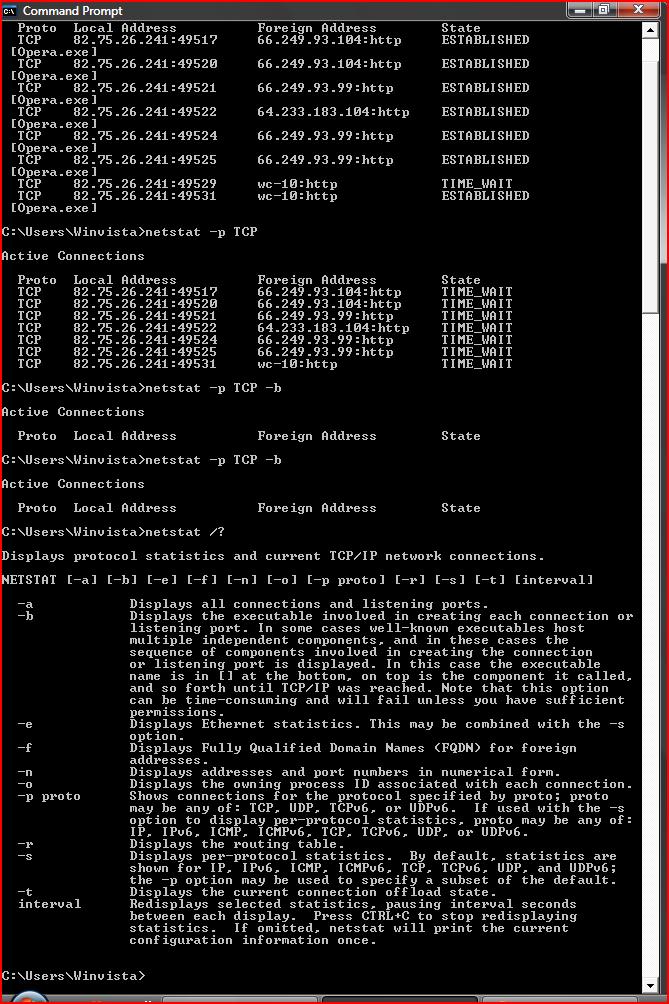
You can run the netstat command from directly from DOS command prompt window. We will not go into any technical details but directly jump to practical examples of using the Netstat command in real world situations:
How do I know who is connecting to my computer from the internet ?
netstat -p TCP
To display a list of external machines (IP address or Machine names with Port Number) that your computer is connnected to. If you wish to display the foreign address only in numeric form, append the -n switch.
I think a virus or trojan on my computer is sending data to the internet ? Can I confirm this
netstat -e 10
This command displays the number of bytes sent and received in real time. The command loops after every 10 seconds to give you an idea of how much data is being transferred and at what rate. If you are not transferring a file over the internet but still large data is being sent across, that signals a problem.
Which program(s) on my computer are making active connections to the internet ?
netstat -p TCP -b
This command displays the list of software executable (like Firefox.exe) that are connecting to the internet. It will also show which websites (or IP address) they are connecting to and what is the status of the connection.
ESTABLISHED - Both hosts are connected.CLOSING - The remote host has agreed to close its connection.LISTENING - Your computer is waiting to handle an incoming connection.
I am downloading an illegal file over a torrent network. Will others come to know about my activity ?
Absolutely, they can run the netstat command on their own machines and your computer's IP address would appear in the command's output. Any IP address can be easily traced to a physical geographic location of the computer with a little help from the ISP.
I have subscribed to a fast broadband internet connection but the data transfer rate sometimes drops down to 0 kbps. Why ?
Run the netstat command with the -b switch and look for values under the column "state" - If you see a lot of active connections with TIMED_WAIT status, that may be holding down the speed of your internet transfer. Kill the culprit process(es) from the Task manager or if it's an essential process, restart the computer.
To learn more about the netstat command, type netstat /? at the command prompt to see a detailed help page.
ReadyBoost Vista
Samsung Electronics heeft vandaag een 4GB solid state disk (SSD) aangekondigd die volgens het bedrijf binnenkort in productie gaat.
De flash-gebaseerde NAND schijf is met name bedoeld als zeer snelle cache voor gebruik in notebooks en pc's in combinatie met Microsoft Windows Vista.
Volgens Samsung zal de schijf compatibel zijn met ReadyBoost, een feature van Windows Vista dat de reactiesnelheid van een PC drastisch moet verhogen door data die veel aangeroepen wordt door het systeem op te slaan op een snel flash-geheugen in plaats van op een disk-gebaseerde harde schijf.
"Door de data van de harde schijf te cachen middels Samsung's flash SSD in combinatie met Microsoft Windows Vista ziet de doorsnee gebruiker een flinke toename in de snelheid van hun PC, die bliksemsnel zal worden"
De Samsung flash-gebaseerde schijf wordt aangesloten op het moederboard via de ATA poort, en werkt met 4 GB NAND geheugen. Omdat Windows Vista automatisch alle data in het ReadyBoost compatible geheugen comprimeert, zal de Flash gebaseerde schijf in de praktijk ongeveer 8 GB aan data kunnen bevatten.
Prijzen en levertijden zijn nog onbekend. Meer productinformatie vindt u op de Samsung website.

zonder <>
Wanneer u in Outlook Express een mailtje doorstuurt, dan wordt de oorspronkelijke tekst voorzien van deze > haakjes.
Als u daar geen prijs op stelt, dan kunt u deze haakjes uit zetten.
Klik hiervoor in het menu op Extra en vervolgens op Opties. Klik op het tabblad Verzenden en klik onder Indelingen voor verzenden van e-mail op Tekst zonder opmaak. Klik vervolgens op Instellingen voor tekst zonder opmaak. Verwijder het vinkje voor de optie Oorspronkelijke tekst met > laten inspringen.
Abonneren op:
Posts (Atom)