First of all, for your 'private investigations' a good start is the ISBN finder that all major search engines provide:
isbn 0596005458 at google
isbn 0596005458 at yahoo
All on-line repositories are quite useful for finding books:
http://www.uploadscout.com/UploadScout/newindex.aspx: rapidshare & megaupload index.
You could input -for instance- digital photography on that search mask, but you can as well search with
rapidshare digital.photography: google
rapidshare "digital photography": yahoo
{frsh=94} {mtch=69} {popl=33} rapidshare "digitalphotography": msnsearch
or whatever local/main search engine you may like...
Well, I'm using "digital photography", or "photoshop" query examples just to demonstrate that finding "photoshop-related" books is almost as easy as writing them (everyone and his dog is writing a photoshop book nowadays).
Yet maybe many of the friends in this room would prefer, instead of "digital photography", this kind of books?
Note, however, that the rapidshare search-examples above are JUST ONE EXAMPLE:
Rapidshare is one of many "upload repositories" where people can (and do with gusto) upload large files.
It's quick, it allows unlimited downloads, and it has some free-happy-hours in the morning. So you don't need, of course, to pay. But there are many similar repositories:
Site:rapidshare.de/ : 30 Mb max, forever but after 30 days unused the file is removed, daily download limit of 3,000 MB for hosted files
YouSendIt: 1 Giga max, after 7 days or 25 downloads (whichever occurs first) the file is automatically removed
mytempdir: 25 Mb max, 14 days * 1200 free downloads, after that only from 23.00 to 7.00.
Sendmefile: 30 Mb max, after 14 days the file is automatically removed
Megaupload: 500 Mb max (!), forever but after 30 days unused the file is removed (like rapidshare)
ultrashare.net/ : 30 Mb max, forever but after 30 days unused the file is removed (like rapidshare)
http://www.spread-it.com/ : 500Mb - Forever or after 14 days if unused
http://turboupload.com/ : 70Mb - download delay in order to show pub
http://www.4shared.com/ : 100Mb - 10Mb per file Forever or after 30 days if unused
-inurl:htm -inurl:html intitle:"index of" +("/audiobooks""/book") +(chmpdfzip) +file mp3
woensdag 2 augustus 2006
Googelen

How to create .3GP (convert avi, mpg to .3gp file)
The most easy way: download Nokia Multimedia Player with 3GP support.Download it from here: http://www.nokia.com/nokia/0,8764,42291,00.html (8MB)This is normal video player for PC platform (Windows OS), but it has several additional functions (conversion to 3gp format).
1) Download and install player.2 Launch Nokia Multimedia Player.
Open your video file (avi or mpg)
3 Press File -> Save as... 4 Enter filename of your 3gp file, and choose resolution and size.
limit:MMS 64KB, 128*96MMS 95KB, 128*96MMS 95KB, 176*144Custom 200KB, 128*96Custom 200KB, 176*144Custom 300KB, 128*96Custom 300KB, 176*144No size limit, 128*96No size limit, 176*1445) Click Save. File converted. That's all!
Microsoft maakt gewone afbeeldingen 3D
Microsoft heeft een preview uitgebracht van een applicatie waarmee gewone, tweedimensionale afbeeldingen omgezet kunnen worden in driedimensionale 'landschappen'. De applicatie heet Photosynth en het werkt door verschillende afbeeldingen van hetzelfde object te analyseren en deze te reconstrueren in drie dimensies.
Met Photosynth zou een gebruiker virtueel door een afbeelding kunnen wandelen of vliegen.Microsoft geeft aanstaande woensdag een demonstratie van Photosynth tijdens de Siggraph 2006 Computer Graphics conferentie in Boston.
Photosynth is ontwikkeld door Microsoft's Live Labs. Live Labs is een groep wetenschappers en ingenieurs die nieuwe manieren bedenken om het internet te gebruiken. Live Labs is in februari van dit jaar opgericht door Dr. Gary Flake. Website: labs.live.com/photosynth/blogs/
dinsdag 1 augustus 2006
Transparant maken in Windows XP.
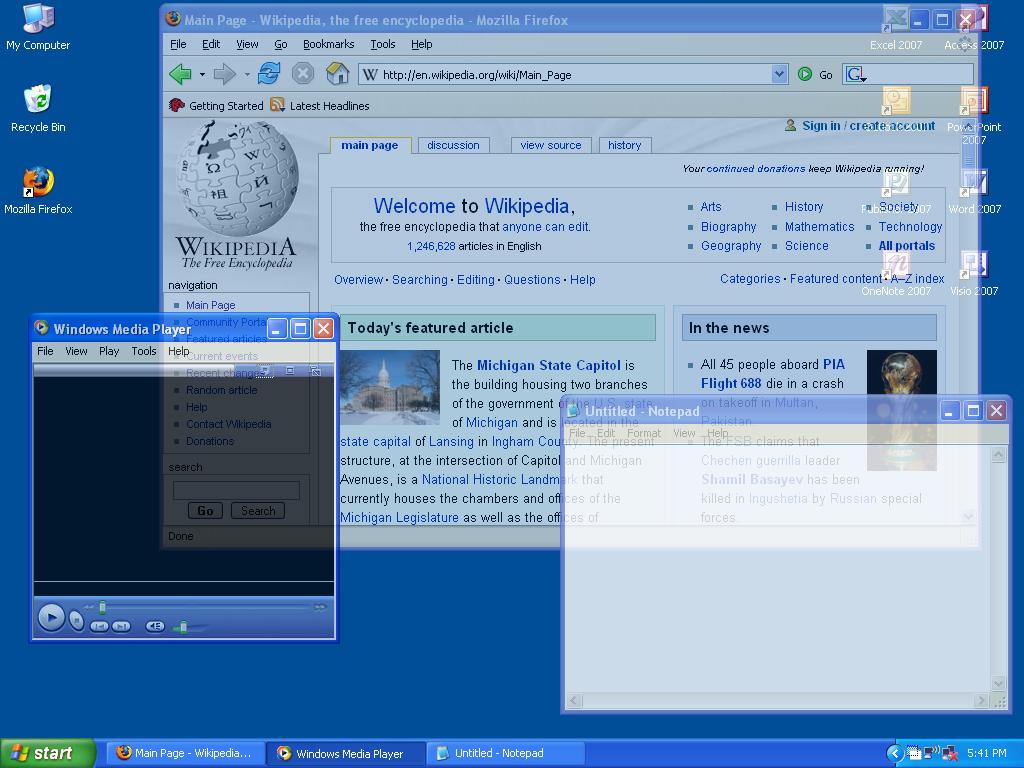
Windows XP... By adjusting the transparency of a window.
you'll be able to see the contents of any windows beneath, as well as the desktop...Windows 2000 and XP have the built-in ability to display variable transparency, but do not provide a method to adjust transparency levels for standard applications... We'll be using a free and extremely lightweight utility called Vitrite...
Klik op foto.
Vitrite uses very little resources, and allows you to adjust the transparency for any Windows application...Vitrite can be downloaded from here...
After you have downloaded and installed Vitrite, you can adjust individual window transparency by pressing Control+Shift+(number from top row of keyboard), for example Control-Shift-1 = 10% visible, etc...
Control-Shift-0 returns the windows back to 100%...Another cool feature of this utility is that you can make a window always stay on top by pressing Control-Shift-+... Pressing this combination again causes the windows to revert back from its "Always on Top" state...
(DRM-free MP3s)
Brummers (Hummers) kieken.
En een nieuwe download site voor muziek zonder dat er codes in zitten (DRM-free MP3s) die het onmogelijk maken om het af te spelen waar jij dat op wil, deze site is dan ook bezig ITunes in te halen.
